

How Eclipse preserved established finance reporting during a move to SaaS and created a foundation for Sharperlight 8.
Quick Answer
 An Infor SunSystems Cloud and Sharperlight integration can preserve established finance reporting when an organisation moves its core finance platform to SaaS. Eclipse achieved this for an insurance organisation by routing finance and reference data from SunSystems Cloud through Infor OS into the reporting database used by Sharperlight, then validating the complete path from source to report.
Key points
-
Reporting continuity was treated as a core migration requirement, not a separate follow-on project.
-
Business Object Documents, connection points and Infor OS dataflows moved the required finance and reference data.
-
Controlled database processing handled new records, updates and the structures required by Sharperlight.
-
End-to-end testing reconciled SunSystems Cloud, the reporting database and Sharperlight outputs.
-
The resulting foundation can support richer visualisation, Excel workflows and governed AI capabilities in Sharperlight 8.
Why can a SunSystems Cloud migration affect Sharperlight reporting?
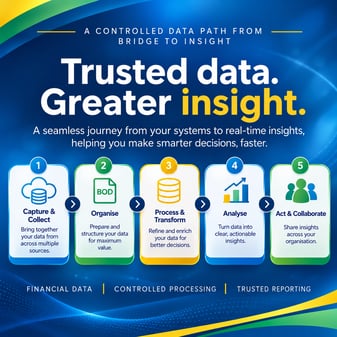 Because finance reports often depend on data flows and database processing outside the core finance application. Moving SunSystems to SaaS changes how downstream systems receive information, even when the reports themselves are expected to remain familiar.
In this case, Sharperlight used data models connected to a reporting database in the client's environment. That database was populated from the previous SunSystems estate and supplied the information used in management reports, dashboards and Excel outputs.
The cloud migration therefore had to address the wider reporting chain. If journals, ledger records, the Chart of Accounts, Business Units or reference data arrived late, incompletely or in the wrong structure, the finance platform could be live while reporting remained unreliable.
What did the client need to preserve?
 The client needed to retain its established Sharperlight reporting approach while changing the underlying SunSystems architecture. Replacing the reporting estate at the same time would have introduced additional cost, risk and user change into an already significant cloud programme.
Eclipse therefore focused on the data delivery architecture behind Sharperlight. The objective was to keep trusted reports and familiar user processes in place while building a new, supportable route from SunSystems Cloud to the reporting database.
How does the SunSystems Cloud and Sharperlight integration work?
The integration uses a controlled, layered route from SunSystems Cloud to finance users. Each layer has a defined responsibility, which makes the solution easier to test, reconcile and support.
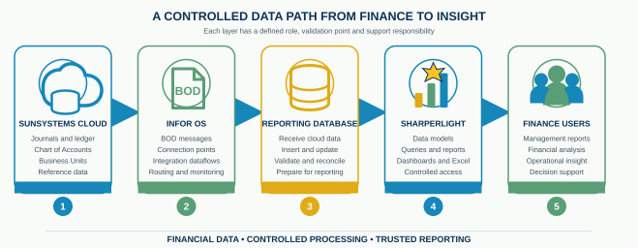
The reporting path from SunSystems Cloud through Infor OS and the reporting database to Sharperlight.
|
Layer |
Role in the reporting chain |
|
SunSystems Cloud |
The core finance platform and source of journals, ledger data and relevant reference information. |
|
Infor OS |
The integration layer, using Business Object Documents and dataflows to route information. A Business Object Document is a structured message used by Infor applications. |
|
Reporting database |
Receives, inserts, updates and prepares the data structures required for reporting. |
|
Sharperlight |
Uses its data models to deliver queries, management reports, dashboards and Excel analysis. |
What data is needed to move through the integration?
The solution had to carry both transactional finance data and the reference information that gives those transactions meaning. This dependency mapping was completed before Eclipse configured the cloud interfaces.
|
Data area |
Why it mattered |
|
Chart of Accounts |
Provides the account structure used to classify and interpret financial activity. |
|
Business Units |
Identifies the organisational entities and reporting context for transactions. |
|
Journals and ledger data |
Supplies the current financial activity and balances used in reports. |
|
Reference data |
Provides supporting codes and attributes required by Sharperlight data models and report filters. |
|
New records and updates |
Ensures the reporting database reflects both newly created information and later changes. |
How did Eclipse implement the integration?
Eclipse implemented the solution as six connected stages, from discovery through to production transition. This reduced the risk of reproducing technical interfaces without first understanding the reporting requirement they supported.
-
Discovery and report mapping: Review existing reports, data models, Business Units and database dependencies to define the information that had to remain available.
-
Cloud data design: Map the required information to the appropriate Business Object Documents, connection points and Infor OS dataflows.
-
Integration configuration: Configure and test the route that delivered the required finance and reference data from SunSystems Cloud.
-
Controlled database processing: Create and validate routines that inserted new information, applied updates and prepared the structures used by Sharperlight.
-
Sharperlight continuity: Keep established data models, queries, dashboards and Excel outputs connected to the processed reporting database.
- Reconciliation and transition: Compare source, database and report outputs, resolve exceptions and move the solution into a supportable production process.
How was the complete reporting path tested?
Testing followed the data from SunSystems Cloud all the way to the final Sharperlight output. A successfully delivered integration message was not treated as proof that the financial report was correct.
SunSystems Cloud > BOD > Infor OS dataflow > Reporting database > Sharperlight
The test scope included multiple Business Units, Chart of Accounts information, journal and ledger processing, reference data, inserts, updates and representative reporting scenarios. Where an unexpected result appeared, the layered design provided clear investigation points across the source, message, dataflow, database and reporting layers.
This made it easier to distinguish an integration issue from a database-processing or reporting issue and helped the project team correct the right part of the solution.
What did the client gain?
The client moved to SunSystems Cloud without replacing the Sharperlight reporting approach that finance users already relied on. The project protected existing reporting investment while modernising the platform and data route beneath it.
-
A cloud-based SunSystems finance platform with downstream reporting requirements included in the migration design.
-
Continuity for familiar Sharperlight reports, dashboards and Excel analysis.
- A structured integration route using Infor OS, connection points and dataflows.
- Controlled processing for finance and reference data, including inserts and updates.
- End-to-end traceability that made exceptions easier to isolate and support.
What does this client example demonstrate?
A successful ERP cloud migration must account for the wider reporting and integration landscape, not just the core application. By combining SunSystems Cloud, Infor OS, database and Sharperlight expertise, Eclipse changed the underlying architecture while preserving the reporting experience used by the finance team.
The practical lesson is clear: identify downstream reporting dependencies early, design the replacement data route around them, and reconcile the final report back to the cloud source before go-live.
How can Sharperlight 8 extend the current solution?
Sharperlight 8 can build on the same trusted data foundation rather than requiring another reporting replacement. Version 8.0.56 introduces richer visualisation, improved Excel workflows and an MCP Server that allows compatible AI assistants to work through Sharperlight data models and existing access controls.
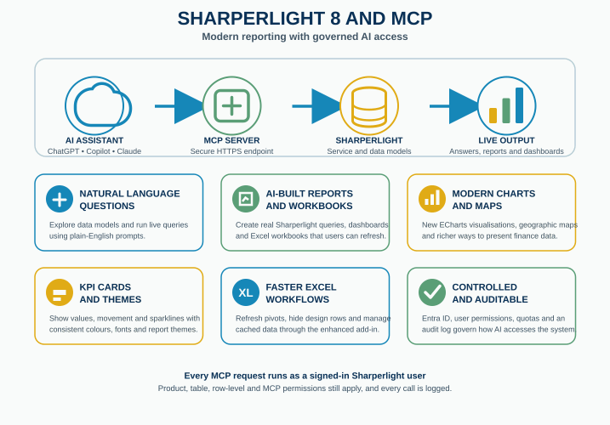
Sharperlight 8 extends the reporting foundation with modern visualisation, Excel improvements and governed AI access.
|
Sharperlight 8 capability |
Potential value for finance teams |
|
Natural-language exploration |
Ask questions in plain English and run live queries through approved Sharperlight data models. |
|
AI-created reporting content |
Create working Sharperlight queries, dashboards and Excel workbooks that users can refresh and maintain. |
|
Modern charts and maps |
Use ECharts, geographic maps and richer visual formats to explain finance and operational data. |
|
KPI cards and themes |
Present values, changes and trends consistently across reports and dashboards. |
|
Enhanced Excel workflows |
Refresh pivots and cached data while keeping Excel as a familiar analysis environment. |
|
Governed MCP access |
Apply Sharperlight permissions, quotas and audit logging when selected users access data through compatible AI assistants. |
What should organisations consider before enabling Sharperlight AI?
AI access should be introduced as a governed extension of the reporting environment, not as an unrestricted route to finance data. A focused pilot allows the organisation to test value, controls and user behaviour before wider adoption.
-
Select clear finance questions and reporting use cases for the pilot.
-
Confirm which Sharperlight products, tables and rows each user can access.
-
Review what information may be sent to the selected AI provider.
-
Set quotas, logging and support processes before opening access more widely.
-
Validate AI-generated queries, dashboards and workbooks against trusted finance outputs.
Frequently asked questions
Can Sharperlight continue to be used after moving SunSystems to the cloud?
Yes. The reporting solution can be retained if the migration includes a controlled way to supply the data and structures on which the existing Sharperlight models depend.
Does SunSystems Cloud connect directly to Sharperlight?
The design depends on the reporting requirement. In this example, SunSystems Cloud data moved through Infor OS into a reporting database that continued to support Sharperlight.
What information can be included in the integration?
The scope can include journals, ledger data, Chart of Accounts, Business Units and other reference information required by the reporting model. Both new records and updates should be considered.
How do you verify reporting after a cloud migration?
Test the complete path from the cloud source to the final report and reconcile representative transactions, balances and reference data at each layer. Message delivery alone is not enough.
Can Sharperlight 8 use AI with SunSystems reporting data?
Sharperlight 8.0.56 includes an MCP Server that can connect compatible AI assistants to approved Sharperlight data models. Existing permissions and governance controls still need to be designed and tested.
Related Eclipse resources
Talk to Eclipse
Planning a SunSystems Cloud migration and need to preserve established reporting or integrations? Talk to us about the architecture, migration and validation approach for your environment: